How WEMo works
WEMo estimates how exposed each place in a bay, estuary or lake is to waves raised by the local wind. This page explains what it calculates, what the results mean, which data it uses, and where it shouldn't be relied on. For WEMo next to NOAA's original WEMo, other fetch models and SWAN, see how WEMo compares.
What it's for
WEMo (Wave Exposure Model) is built for enclosed and semi-enclosed waters: estuaries, sounds, bays, lagoons and lakes, where the waves that matter are generated by wind blowing across the water body itself. It turns wind history, water depth and the shape of the shoreline into wave height, wave energy and the forces waves put on the seabed, for as many sites as you draw.
Typical uses include:
- Siting seagrass and other habitat restoration, where too much wave energy prevents plants establishing.
- Designing living shorelines and choosing between softer and harder shoreline treatments.
- Comparing sites for aquaculture gear, moorings or monitoring stations.
- Screening shorelines for erosion vulnerability.
WEMo is built for sheltered water. Its wind waves are generated inside the area you model. On open coasts and near bay mouths, ocean swell can matter as much or more: turn on Swell in the run form to add it, reported separately. Without it, exposure on open coasts is underestimated.
How a run works
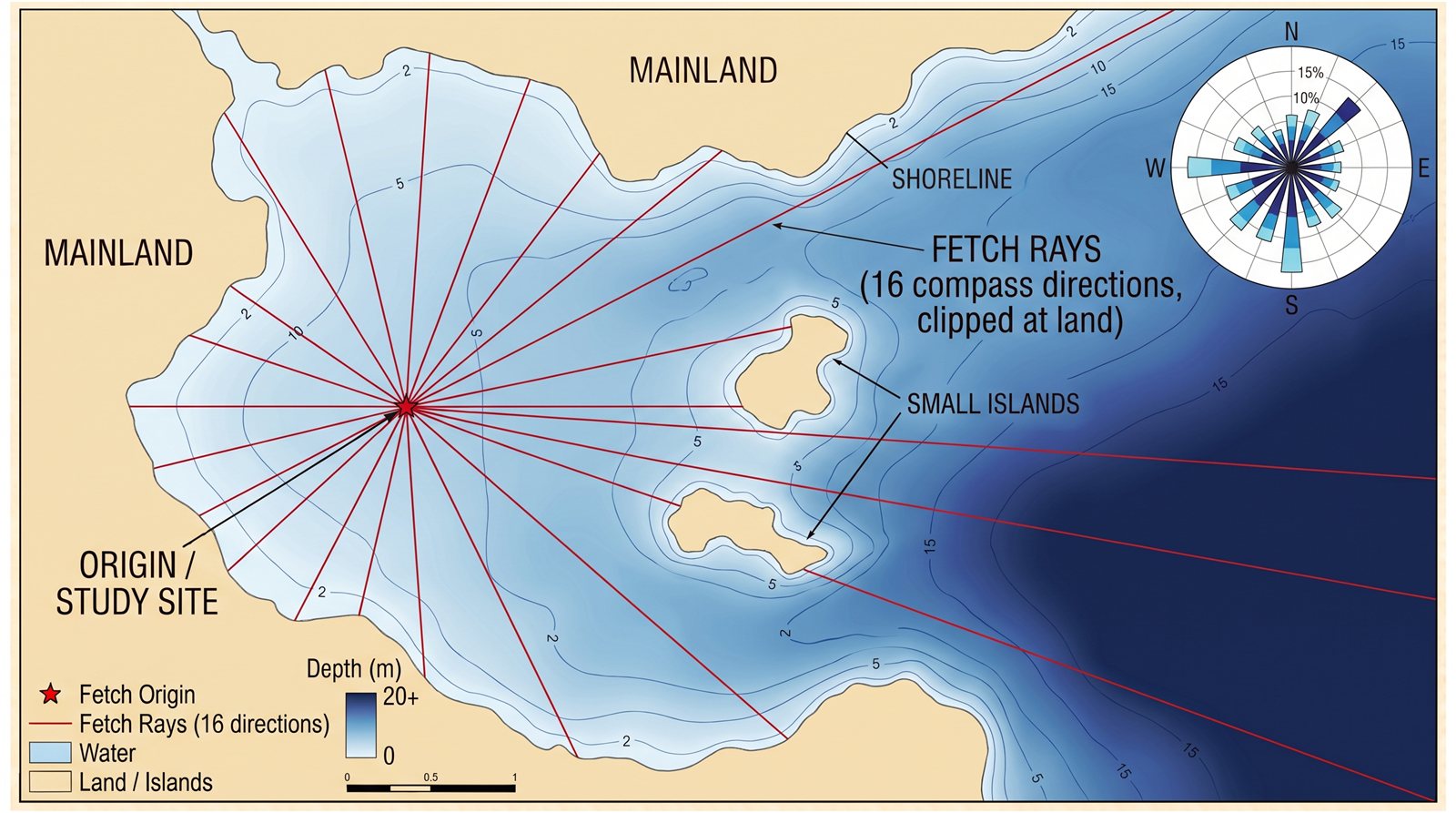
- Sites. You draw an area (or place points); WEMo lays a grid of sites over the water inside it at the spacing you choose.
- Fetch. From every site it measures the distance of open water in each direction (8 to 56 directions) over the bathymetry, stopping at the first land or at the maximum fetch. By default each direction is sampled by three rays spread across its share of the circle, which keeps the edges of land shadows from showing as streaks (see Wave physics). It also works out an effective fetch, which blends each direction with its neighbours because wind transfers energy to the water over a spread of angles.
- Depth along each ray. Water depth is sampled along every ray at the sample spacing, at the water level you set.
- Wind. For each ~25 km wind cell, WEMo reads 11 years (2014–2024) of hourly wind and summarises it by direction: how often the wind blows from each direction and its mean speed. Along a coast, a cell's reanalysis grid box can be largely land, and wind over land is slower, so its winds can read low over the water (at the Lake Erie buoys near the shore, 20–30% below the buoys' own wind). The Wind Data view shows how much of each cell is land and lets you take a cell's wind from a nearby cell that is mostly water, or from a nearby buoy or weather station (below).
- Measured wind from a buoy or station. The Wind Data view lists the measuring stations within 100 km of a cell that recorded wind during your time period: NOAA's buoys, coastal and tide stations (NDBC; US waters, the Gulf of Mexico, the Caribbean and some Pacific islands), Environment and Climate Change Canada's buoys (Canada's Atlantic and Pacific waters and the Great Lakes, from Fisheries and Oceans Canada's archive), moored buoys and platforms in Europe and elsewhere collected by the Copernicus Marine Service (from the UK, Irish, French, Spanish, Norwegian, German, Dutch and other agencies, when the WEMo server has a Copernicus Marine account), and weather stations worldwide (NOAA's Integrated Surface Database, mostly airports). The same buoy reported by two of these sources is listed once. With Show wind cells, buoys and stations on the map ticked in Wind Data, they are also marked on the map (a circle for a buoy, a square for a coastal, tide or platform station, a diamond for a weather station); click one to see what it is, how far it is from each wind cell and how many years of your period it covers, and to use its wind for a cell. Choosing one makes that cell's sites use the station's hourly wind instead of the reanalysis. WEMo converts its speeds from the anemometer's height to the standard 10 m (heights come from NOAA's station pages, which also cover Canada's buoys, or from the Copernicus data files; where none is published, 4 m is assumed for a buoy, 5 m for Canada's and 10 m otherwise, and the view says so), takes one reading per hour, and leaves out the hours the station didn't record; the view shows what share of the period it covers, and a station with under a quarter of the hours can't be used. Measured wind is the real wind at one point, so it is usually better than reanalysis for a nearby open-water site, but a station on land, or a tide gauge on a pier, reads low for winds that blow off the land. Prefer a buoy or a station over open water, near your sites. When a buoy from any of these sources is within 30 km of a cell's sites, Wind Data offers it first, and the run form offers a Nearby buoy wind source that gives every such cell its buoy's wind (cells without one keep Open-Meteo). When the nearest buoy is farther, WEMo says so and suggests Open-Meteo or uploading your own wind record. Some countries limit how their weather-station data may be used commercially; check before using it in paid work outside the US.
- Waves. For each ray, a wave is grown from the wind over the fetch and carried toward the site across the changing depth, with shoaling, bottom friction, growth limited by the depth and depth-limited breaking (linear wave theory; see Seabed and breaking). By default each wind direction's waves are also spread over neighbouring directions (see Wave physics). This gives the wave height, period and energy arriving at the site from that direction, plus the orbital velocity and shear stress it produces at the seabed.
- Combine. The directions are combined, each weighted by how often the wind blows from it, into one set of results per site.
What the results mean
| RWE (Representative Wave Energy) | The wave energy in one wavelength per metre of wave crest (J/m), summed over all directions and weighted by how often the wind blows from each. It's a relative measure: use it to compare sites within the same area and wind climate, not as an absolute energy at a moment in time. |
|---|---|
| Average / maximum wave height (m) | The wave height arriving at the site, averaged across directions (and the largest single direction), under the typical wind from each direction. |
| Orbital velocity (m/s) | How fast the water moves back and forth at the seabed under those waves. Useful for judging whether sediment or plants are likely to be disturbed. |
| Bed shear stress (Pa) | The drag the waves put on the seabed, calculated for the sediment grain size in the run settings (0.2 mm fine sand unless you change it). |
| Direction of maximum wave | The direction the largest waves come from at that site. |
| Wave direction arrows | Switch on "Wave direction arrows" next to the map legend to draw an arrow over the results showing where each site's wave energy travels. The arrow starts from the energy-weighted mean direction the waves come from over the wind record: each direction's share of RWE (how strong its waves are and how often the wind blows from it) counts as a vector, and the vectors are added. This is the climate version of the mean wave direction a spectral model such as SWAN plots, and unlike the direction of maximum wave it isn't pulled toward rare storm directions. Its length and darkness show how one-sided the exposure is (the length of the summed vector over the total energy, also in the downloads as direction_concentration, 0 to 1): long and solid where nearly all the waves come from one side, short and faint where several directions, or opposite shores, contribute much the same. Where the sites are dense, each arrow averages the sites around it. With swell in the run the arrows include it. Click a site to see its wave energy by direction as a rose. The report's energy and wave height maps carry the arrows too when they are switched on. |
| Fetch / effective fetch (m) | The open-water distance in each direction, and the direction-blended version used for wave growth. |
| Exposure classes | In the PDF report, sites are split into fifths by RWE, from very sheltered to very exposed. The classes are relative to that run: "very exposed" means among the most exposed fifth of those sites. |
| Wind cell (W1, W2, …) | Which ~25 km wind cell a site falls in. With blended wind (the default), a site's wind is mixed from the cells around it, weighted by distance, so results change smoothly across cell borders (see Wave physics); with blending off, every site uses the wind of its own cell. Either way, a cell whose wind you took from a nearby cell or a measuring station uses that wind. |
| Swell height (m) | Runs with swell only. The swell height reaching the site, averaged over the swell climate (weighted by how often swell comes from each direction), with the maximum over directions and the share of the offshore swell that arrives. The wind-wave results above don't change. |
| Wind waves + swell (m) | The typical combined height, treating wind sea and swell as independent seas: the square root of the sum of their average energies (heights squared). |
| RWE with swell | RWE of the wind waves plus the same measure for the swell (weighted by how often swell comes from each direction). Swell carries much more energy per metre of crest than short wind waves (energy grows with the period squared), so where swell reaches a site this can be many times the wind-wave RWE. Compare it between sites, as for RWE. |
Maps in the app and the report smooth the results between sites so the pattern is easy to see. Only the sites themselves are modelled; values between them are estimates.
Data sources
Bathymetry: NOAA Coastal Relief Model on the US coasts
By default (Best available in the run form) runs on the US coasts use NOAA's Coastal Relief Model (CRM), where the WEMo server has it installed. NOAA NCEI builds the CRM from hydrographic surveys, multibeam, lidar and coastal elevation models, as one grid of the seabed and the land behind the shore. Its 2023–2025 volumes cover the Atlantic, Gulf of Mexico and Pacific coasts, Puerto Rico and Hawaii at 1 arc-second, about 30 m cells, so a run sees the channels, shoals, small islands and marsh edges that GEBCO's 450 m cells smooth away. The run grid is built at the CRM's cell size (or your sample spacing, if coarser), and GEBCO carries the fetch rays beyond the CRM's coverage, blended into it over 500 m of water so there is no step at the seam. The run form tells you how many of your sites the CRM covers, and the results and report say which bathymetry a run used. The CRM is referenced to the EGM2008 geoid (Puerto Rico and Hawaii: local mean sea level), which is close to mean sea level, like GEBCO, so water levels mean the same thing on both. The Great Lakes and Alaska aren't in the CRM; runs there use GEBCO. Choose GEBCO only to compare with earlier runs. With the CRM at every site, refraction is available without uploading your own file.
Bathymetry: GEBCO
Everywhere else, and beyond the CRM, depth and shoreline come from the GEBCO_2026 global grid (15 arc-second, roughly 450 m cells), kept on the WEMo server and read for your area and resampled to a 100 m grid. Land is wherever the grid's elevation is at or above the water level you set.
Bathymetry: your own GeoTIFF
If you have a detailed survey, lidar or DEM for your area, upload it in the run form as a single-band GeoTIFF with a coordinate system, as elevations (negative under water) or depths (positive under water). A run lays it over the best available bathymetry (the CRM on the US coasts, GEBCO elsewhere): your file is used wherever it has data, blended in over its outer 500 m, and the CRM or GEBCO carries the fetch rays beyond its edge. Runs use your file's own cell size down to 10 m; over a very large area (your sites plus the max fetch) the grid is coarsened to fit the server's memory, and the run form tells you when. Files stay in your account until you delete them (up to 10, 500 MB each) and are deleted with your account.
Map and basemaps
The planner's map covers the whole world. Its depth charts (Bathymetry and Nautical) are drawn from the same GEBCO grid the model reads, move with the tide slider, and are for orientation only, not for navigation. Their colours span the depths of the area on screen, from 0 m to the depth most of the water there is shallower than, with a contour line at a round interval (the legend gives both), so a shallow bay and a deep shelf both show their depth differences. Satellite imagery is the default background, so you can draw areas, points, vegetation and structures against what's actually on the ground: Satellite is Esri World Imagery (Esri, Maxar, Earthstar Geographics and the GIS User Community) where the server has an Esri key, otherwise EOX's worldwide Sentinel-2 cloudless mosaic (10 m pixels; Sentinel-2 cloudless by EOX IT Services GmbH, contains modified Copernicus Sentinel data 2016 & 2017), and Satellite (USGS) is the U.S. Geological Survey's National Map imagery, which covers the United States only. Imagery comes from different dates and sources and its shoreline won't always match GEBCO's; the model always uses the bathymetry, never the imagery, to decide what is land and water.
World map and Light gray map are OpenStreetMap maps from OpenFreeMap (roads, towns and place names; the light gray one keeps result colours easy to read), and Ocean map (Esri), where the server has an Esri key, shows seafloor relief and marine names. The Shoreline button draws OpenStreetMap's world coastline (© OpenStreetMap contributors, ODbL) over any basemap: use it to trace your area along the real shore and to see where GEBCO's ~450 m coast is off. It is for reference only: runs still decide land and water from the bathymetry, so where the line and the bathymetry disagree, the run follows the bathymetry (upload your own bathymetry for a better coast).
Wind: Open-Meteo historical weather
Hourly 10 m wind speed and direction from Open-Meteo's historical weather service, which draws on the ERA5 reanalysis (about 25 km), ERA5-Land and ECMWF's high-resolution model. By default WEMo uses 2014–2024 and the mean speed for each direction. In the run form you can choose another time period (any dates from 1940 to about a week ago, up to 30 years), only some months of the year, and only the windiest hours (see Run settings). Sites are grouped into 0.25° (about 25 km) cells with one record each; by default each site's wind is blended from the cells around it, so results don't step at the cell borders (untick Blend wind between neighbouring cells under Wind in the run form to give every site its own cell's wind). WEMo asks for the nearest grid cell over water, since a cell centre over land gives land wind, which in a narrow bay can be much lower than the wind over the water. You can see each cell's wind rose in the planner before or after a run.
Strong-wind correction and speed factor. ERA5 is known to read strong winds low: against offshore lidars and a met mast the bias appears above about 10 m/s and reaches almost 10% at the strongest winds (Wind Energy Science, 2024). Because wave height rises roughly in step with wind speed, WEMo by default raises hourly speeds above 10 m/s, from 0% at 10 m/s to +10% at 20 m/s and above. The correction is approximate (it was measured offshore, not in every bay) and you can turn it off in the run form. You can also set a wind speed factor that multiplies every speed, for example the ratio you find between Open-Meteo and a local weather station over the same period; if you do, turn the ERA5 correction off so the two don't add up. The factor also applies to uploaded hourly wind.
Wind: measured at a buoy or station
For any wind cell you can use the hourly wind measured at a nearby buoy or weather station instead of Open-Meteo: NOAA's National Data Buoy Center (buoys and coastal stations in US waters, the Great Lakes and some others; public domain), Environment and Climate Change Canada's buoys (from Fisheries and Oceans Canada's archive through CIOOS; Open Government Licence – Canada), the Copernicus Marine Service's moored buoys and platforms (mostly European; E.U. Copernicus Marine Service Information, when the WEMo server has a Copernicus Marine account) and NOAA's Integrated Surface Database (weather stations worldwide, mostly airports). How they are found, chosen and converted to 10 m is described under How a run works. The strong-wind correction (above) isn't applied to measured wind.
Wind: your own record (CSV)
Instead of Open-Meteo you can upload a wind record from a weather station, a buoy or a model, as a CSV file, in the run form's Wind source. The same record is used for every site of the run, so it suits areas small enough for one wind record to describe, or a station close to the sites and exposed like them. Two kinds of file are accepted:
- Readings: one row per reading (hourly, 10-minute or any regular interval), with the direction the wind comes from in degrees (a column named wind_direction, direction, WDIR or dir) and its speed (wind_speed, speed, WSPD or ws), and optionally a timestamp column. Calm readings (speed 0) need no direction. The whole record is used, and every reading counts equally.
- A summarized wind rose: direction, speed (the mean speed from that direction) and proportion, the share of the time the wind blows from that direction, in percent or as a fraction. If the shares add up to less than 100%, the rest is counted as calm. A wind rose can't be used with Winds used other than All winds, which needs the individual readings.
Choose the unit of the file's speeds (m/s, knots, km/h or mph) and the height of the anemometer. Wave growth formulas are based on the wind 10 m above the water, so WEMo scales the speeds to 10 m with the 1/7 power law used for open water, U10 = Uz (10 / z)^(1/7): a 3 m anemometer's speeds are raised by about 19%, a 30 m mast's lowered by about 15%. Both can be changed after the upload, and the run form shows the record's wind rose as the run will use it. A land station usually reads lower than the wind over the water, even at 10 m; where you can compare it with a record over the water, the wind speed factor corrects for that. The strong-wind correction applies to Open-Meteo only. With swell switched on, the swell comes from the standard Open-Meteo marine record, as there are no Open-Meteo wind dates to match.
Swell: Open-Meteo marine or your own record
For runs with swell: hourly swell height, mean period and direction from Open-Meteo's marine service, by default the swell part of Meteo-France's MFWAM wave model (about 8 km, October 2021 on), for the same period and months as the wind (from October 2021 on, when the wind period starts earlier). For earlier years you can choose ERA5 (about 50 km, 1940 on), but Open-Meteo only has ERA5's total waves, not its swell: where the wind blows onshore these include wind sea that WEMo's wind waves also count, so exposure on open coasts can be counted twice. Each site takes the swell of the nearest sea cell of the wave model, or of an offshore point you choose. You can instead upload a record from a buoy or a wave hindcast as CSV (see Swell).
Runs, rerunning and changing the area
Where runs are kept. Every run is kept on the WEMo server with its project: the results (the site table, the per-direction detail and any structures table) on the server, and the area and settings the run used in the project itself. The Runs button lists a project's runs, newest first, with when they ran, how many sites, their main settings and whether they finished. They stay until you delete them there, or delete the project.
Recalling a run. In the Runs list, Show results puts a run's results back on the map, with the area and settings it used, and Run again with these settings puts its area and settings back and opens the run form filled in, ready to change. Runs made before WEMo recorded their settings can still be shown, but not rerun from the list.
Running again. After a run, Change settings and run again (in the run results) keeps the area, sites, structures, vegetation and every setting, and opens the run form with this run's values and a new name (e.g. "Bay study (2)"). Start over with a new area clears the map instead; the project's earlier runs stay in its list.
Changing the area. With the Polygon tool, click inside an area to edit it: drag a corner to move it, drag one of the small circles on the sides to add a corner, double-click (or right-click) a corner to remove it, or drag inside the area to move all of it. Delete area removes it, and Undo steps back. When the area has a site grid, the grid follows the new shape. Click outside the area when done; a click on empty map then starts a new area as before.
Run settings
| Directions (8–56) | How many wind directions per site. More directions give a slightly more detailed answer; 16 is usually within a few per cent of 56 and much faster. |
|---|---|
| Rays per direction (1, 3 or 5) | Under Wave physics. How many rays sample each direction; 3 (the default) removes the streaks single rays leave at the edges of land shadows, at about 2.5 times the run time (see Wave physics). |
| Max fetch (km) | The longest ray. This one changes the answer: capping fetch below the real open-water distance makes exposed sites look calmer than they are. Keep it longer than the widest open water around your sites. |
| Sample spacing (m) | How often depth is read along each ray. With GEBCO the depth grid is 100 m, so spacing below 100 m makes a run slower without adding detail; with NOAA's Coastal Relief Model (about 30 m cells) a spacing of 25–50 m uses its detail. With your own bathymetry, a spacing close to its cell size uses its detail. |
| Time period | The dates and months of wind the run uses. The default is 2014–2024, all year, the standard record. Pick other dates to model a particular year, season or event (for example 1–10 March 2018), and untick months to use only part of each year, such as a May–September growing season or Dec–Feb winters. Dates outside 2014–2024 are downloaded for the area the first time they're used. A short period describes the wind of that time only, not typical conditions. |
| Winds used (0–99) | Which hours of the wind record the run uses. At 0 (the default) it uses every hour: typical conditions, the standard WEMo run. At P it uses only the windiest (100 − P)% of hours: 95 keeps the windiest 5%, 99 the windiest 1%. Each direction then gets the mean speed of those strong-wind hours, and directions are weighted by how often the strong winds come from them, which is often quite different from the everyday wind. Results then describe exposure during strong winds: wave heights, energy and seabed forces all go up. The wind roses in Wind Data and the report show the same selection, with its starting speed. |
| Water level (m) | The water surface for the whole run, relative to the bathymetry's datum. Use the tide presets to model low or high tide: they come from the NOAA tide station nearest your area that publishes tidal datums (NOAA CO-OPS, within 75 km; the map's tide box names it and its distance), as the lowest and highest astronomical tide (LAT, HAT) relative to its mean sea level, or the mean lower-low and higher-high water where it publishes no astronomical extremes. Outside the US there's no station, and you set the level with the slider. Clicking the map with the Depth tool shows the depth there and, under it, where that depth comes from (NOAA's Coastal Relief Model or GEBCO), and a run's site popups and downloads say the same for each site. For a lake above sea level, set it to the lake's surface: GEBCO gives the floors of lakes such as the Great Lakes as heights above sea level (Lake Erie's surface is about 174 m), and land is whatever is at or above the water level. A lake gets no ocean swell. GEBCO 2026 has known depth errors in parts of the Great Lakes: some patches were compiled with depths below the lake surface stored as if the surface were at sea level, so relative to the surface they read far too deep (in Lake Erie, 150–230 m along the Canadian shore around Long Point Bay, where the lake is at most 64 m deep). GEBCO lists this datum problem among its known issues. For lakes, upload your own bathymetry, for example NOAA's Great Lakes grids, rather than relying on GEBCO. Deeper water generally means more wave energy reaches a site; shallower water means more force on the seabed. |
Seabed and breaking
Refinements of the original formulation are part of every run, with default values you can change under "Seabed & breaking" in the run form. The defaults were calibrated against SWAN, the standard spectral wave model, on idealised cases and on 939 sites in the lower Chesapeake Bay (see Validation). "Original 2007 model" there sets everything back to the published formulation (and turns directional spreading off), which the engine then reproduces exactly.
| Bottom friction Cb (default 0.019 m²/s³) | Waves in water shallower than about half a wavelength lose energy to friction with the seabed. WEMo uses the same bottom-friction formula as SWAN (JONSWAP), applied step by step along each fetch ray with the wave's own period. 0.019 is SWAN's value for smooth beds and matched SWAN best in our comparison; 0.038 is SWAN's value for sandy beds (Zijlema et al. 2012), which on top of WEMo's growth curves left long, shallow fetches 25–30% low; 0 turns friction off. |
|---|---|
| Depth-limited growth (default on) | In shallow water the wind can only raise waves so high, however long the fetch. With this on, waves stop growing at the fully developed height for the local depth measured by Young & Verhagen (1996) at Lake George, which is about 2 m deep. In medium depths that limit held waves 15–20% below SWAN (on a flat 5 m bed and in central Lake Erie at 20 m/s), so WEMo raises it there: by nothing in very shallow water, rising to 25% from about 8 m of water at 20 m/s (from g d/U² = 0.05 to 0.2). A wave already higher (arriving from deeper water) isn't grown further, and friction and breaking bring it down. The original formulation grew waves as if the water were deep, and over long, shallow fetches gave heights well above measured growth: over depths of 1–4 m and fetches of 10–30 km it ran about 1.8 times Young & Verhagen's curves (median), where the defaults come within about 10% (exact at 1 m; 29% above at 4 m, beyond the depths their curves were measured in). |
| Breaking slope (default: from the bathymetry) | Waves approaching the shore break sooner on a gentle slope than on a steep one (Goda's breaking formula). The original formulation used one fixed beach slope, 1.909°, everywhere. By default WEMo now reads the slope along each ray as it approaches the site, over at least 50 m, and uses no slope where the bed deepens; slopes steeper than 1:10, the formula's range, count as 1:10. You can set a fixed angle instead. |
| Breaker index (default 0.5) | The largest significant wave height as a share of the water depth. 0.5 matched SWAN in the surf zone. The original model used 0.7, which left surf-zone heights 40–60% above SWAN's; SWAN's own breaker index, 0.73, applies to the highest waves rather than to the significant height. |
| Sediment grain size d50 (default 0.2 mm) | The median grain size used for bed shear stress: about 0.03 mm for silt, 0.2 mm for fine sand, 0.5 mm for medium sand, 2 mm for gravel. It doesn't change the waves. |
Vegetation
Seagrass beds, salt marsh and other plants take energy out of the waves that pass through them. You can add vegetation areas to any run: draw them on the map with the Vegetation tool, or import polygons from a GeoJSON file (in longitude/latitude; optional feature properties name, type, height_m, stem_width_m, density_per_m2, drag_coefficient). Areas are saved with the project and carry over from run to run, so you can compare a site with and without a planted or restored bed.
WEMo uses Mendez & Losada's (2004) formula for wave damping by vegetation, the one SWAN uses. Wherever a fetch ray crosses vegetation, the waves lose energy according to the plants' height, stem width, number of stems per square metre and drag coefficient, and the water depth: plants that fill more of the water column damp more, and the effect is small in deep water. Waves grow again with the wind after they leave the vegetation. Each area has its own values:
| Plant types | Eelgrass (Zostera): 0.5 m tall, 8 mm blades, 500 per m², drag coefficient 0.2. Turtle grass (Thalassia): 0.3 m, 10 mm, 1,000 per m², 0.2. Salt marsh (Spartina): 1.0 m, 6 mm stems, 300 per m², 1.0. These are typical published values to start from; change any of them, or enter your own survey data (the area then shows "Custom values"). |
|---|---|
| Height | Canopy height. Plants taller than the water depth (emergent marsh) count only up to the water surface. |
| Stem width & density | Stem diameter or blade width, and stems (or shoots) per square metre. Together they set how much plant area the water pushes through. |
| Drag coefficient | How strongly each stem resists the flow. Flexible seagrass that bends with the waves has a low value (around 0.1–0.3); stiffer marsh stems are higher (around 1). It is the least certain value; calibrate it against local measurements if you can. |
The results show which sites are inside vegetation, the per-direction download gives how many metres of vegetation each ray crossed, and the report lists the areas and their values. Plants don't change the bed shear stress, which still uses the sediment grain size, and a site's vegetation isn't taken from the bathymetry: only the areas you draw or import count.
Read vegetation effects as an upper bound. WEMo's damping formula is the same as SWAN's, and with no wind the two agree within a few per cent. With wind blowing over the bed they don't: SWAN's wind input rebuilds the waves inside the bed much faster than WEMo's growth curves do. WEMo spreads the plants' drag over the whole wave spectrum at the wave's own period, each part with its own wavelength, so the short wind waves that barely reach a submerged canopy lose less than the peak waves (October 2026; before, one wave at the deep-water period took it all). That narrowed the gap only a little: in our comparison a 2 km eelgrass bed in 1.5 m of water took about 60% off the wave height at the site in WEMo (65% before) and 13–20% in SWAN; a 300 m marsh fringe took off 81% and 68%. Most of the remaining difference is how fast the wind rebuilds the waves inside the bed, and SWAN's spectrum shifting toward shorter waves there. Treat WEMo's result as the most damping to expect, and check it against local measurements before relying on the size of the effect.
Coastal structures
You can add seawalls, revetments, offshore breakwaters and sills (low rock sills, oyster reefs, reef-ball lines) to a run and see how they change the waves around them. Draw them on the map with the Structures tool (click along the line, then click the last point again to finish), or import lines from a GeoJSON file (in longitude/latitude; optional feature properties name, type = seawall, revetment, breakwater or sill, crest_elevation_m, crest_width_m, slope as the tangent or slope_n as 1:n, reflection, transmission, permeable = true or false). Structures are saved with the project, like vegetation.
To change one, choose the Structures tool and click the structure: a box opens with its name, type and values, and its points get handles. Drag a point to move it, drag the small circle between two points to add a point, and double-click (or right-click) a point to remove it. Delete structure in the box, or the Delete key, removes it; Undo steps back through these changes. Click empty map when you're done. The same values can also be changed in Configure run, under Structures, and structures can be edited after a run for the next one.
| Seawall / bulkhead | A vertical wall. 90% of the wave height is reflected unless you enter another value (vertical walls reflect 70–100%; Goda 2000). With no crest elevation, waves stop at it, as at a shoreline. Give its crest elevation and waves overtop it when the water level comes near or over the crest. |
|---|---|
| Revetment / riprap | A sloping rock or concrete face. The share reflected follows its slope and the waves' steepness (Seelig & Ahrens 1981), typically 20–50% for a 1:2 rock slope and more for a smooth concrete face. With no crest elevation, waves stop at it; with one, they can overtop it. |
| Offshore breakwater | A rubble mound (or a concrete or sheet-pile breakwater: see permeability) standing in the water (default crest +2.0 m, 3 m wide, 1:2 slopes). Part of the wave height passes over and through it, from d'Angremond et al.'s (1996) formula with its crest height above the water level, crest width and slope (between 7.5% for a high crest and 80%); the wind then rebuilds the waves behind it. Part is reflected (Seelig & Ahrens), with reflection and transmission together never more than the incoming energy. |
| Sill / reef / living shoreline | The same calculation for a low structure (default crest +0.3 m, 1.5 m wide). It works best when its crest is near or above the water: raise the water level (a storm surge, high tide) and more passes over. A crest more than 2.5 wave heights under water has less and less effect, and none at 5. |
Crest elevations are on the bathymetry's datum, like the run's water level (GEBCO: about mean sea level), so the same structure can be tested at several water levels. Leave the reflection or transmission blank to have WEMo work it out, or enter a measured or design value.
Overtopping and permeability
Overtopping. A seawall or revetment entered without a crest elevation is taken as always above the water: no waves pass. With a crest elevation, the share of the wave height that passes over it depends on how far the crest stands above the run's water level, compared with the height of the waves arriving: for a vertical wall from Goda's (1969) relation, Kt = 0.5 (1 − sin(π/4.4 (Rc/H + 0.4))), which is 0 when the crest is 1.8 wave heights or more above the water, about 0.36 with the crest at the water level, and 1 when it is 2.6 wave heights under it; for a revetment from d'Angremond et al.'s formula (as for a breakwater, but down to 0 for a high crest). The wind then rebuilds the waves behind the structure. Run the same project at a storm-surge water level to see where a wall stops protecting the water behind it. An overtopped wall also reflects less, since reflection and transmission together never exceed the incoming energy. It is a wave-height screening, not an overtopping discharge (litres per second per metre) for flood design: use EurOtop for that.
Permeability. Revetments, breakwaters and sills are rubble or rock (permeable) unless you choose concrete / sheet pile (impermeable) under Construction. Waves lose energy in a rubble mound's voids; a smooth, impermeable structure lets more pass over its crest (d'Angremond et al.'s coefficient 0.80 instead of 0.64) and reflects more (Seelig & Ahrens' smooth-slope curve, a = 1.0, b = 5.5, instead of rubble's 0.6 and 6.6). A seawall is always treated as a vertical impermeable wall.
Reflected waves
Waves reaching a structure are partly reflected, like light from a mirror: the waves reflected toward a site arrive from the direction its fetch ray meets the structure, and were travelling toward the structure from the mirror-image direction. WEMo models the waves arriving at each structure at stations a short way off both sides of it, every 50 m along it, with the structures in place. For each site, every fetch ray that meets a structure first receives the reflected waves: the incoming waves from the mirror-image direction at the nearest station on the site's side, times the reflection coefficient, carried to the site with shoaling, bed friction and breaking (as for swell). Their energy is added to the site's waves for the wind direction that drives them, so they raise the wave height, orbital velocity, bed shear stress and RWE. In front of a reflective wall the waves can be markedly higher than without it. The per-direction download gives the reflected wave height and the structure each ray meets.
Toe scour
In front of a reflective structure the incoming and reflected waves form a partly standing wave, whose near-bed velocity at the toe is up to (1 + Kr) times that of the incoming waves. For each station the run reports the incoming wave height, reflection and transmission coefficients (transmission only where waves can pass: breakwaters, sills, and seawalls and revetments with a crest), the crest's height above the water and the construction, the orbital velocity and bed shear stress at the toe, and how often (as a share of the wind) that stress exceeds the critical stress for the run's sediment (Soulsby 1997). High: the time-weighted toe stress is above critical; moderate: only the strongest wind directions are. It says where the bed in front of a structure is likely to erode, not how deep a scour hole will be. See Structures: toe scour in the run results (View, or Download for every station).
Before and after
With Before and after on (the default), WEMo also runs the same sites without the structures. The results then have each site's values without them and the change, and the map can be coloured by the change in wave height, RWE or longshore transport: red where waves get higher (often in front of reflective walls), blue where they get lower (in the lee of breakwaters and sills). This doubles the run time.
Downdrift shoreline
Waves arriving at an angle to the shore move sand along it. WEMo gives each site an index of the potential longshore transport, the sum over directions of the share of the wind times H2.5 sin 2α, where α is the angle between the waves and the shore normal (the CERC formula without its coefficient, so it is relative: for comparing sites and the same site with and without structures), and the direction the sand would move. The shore normal at a site is the direction of its open water. Sites past the downdrift end of a structure, in the net drift direction before it was built and within about its own length (at least 500 m), are flagged as downdrift of it: a structure that holds sand back, or a seawall that stops a bluff from feeding the beach, can starve the shore beyond it (erosion at a seawall's downdrift end reaches about 0.7 of its length; McDougal et al. 1987). It is a pointer to where to look, not a sediment budget.
A screening tool, not a design. Each wave is reflected once (no waves bouncing between two walls), there is no diffraction around a structure's ends (directional spreading softens the shadow edges), and a structure shorter than a grid cell or two, or than the spacing between fetch rays at the distance of a site, is only roughly represented. Swell is stopped by seawalls and revetments on the last few kilometres of its path and reduced by breakwaters and sills there, but not reflected. Structures can't yet be combined with refraction. Use a phase-resolving model and a coastal engineer for design.
Wave physics
Rays per direction. The published WEMo model sends one straight ray per wind direction from each site. Where that ray just clears a headland, an island or a shoal, and the next site's ray just clips it, the two sites get noticeably different waves, so the edge of each direction's shadow is a sharp line: in the results, faint straight streaks fan out from headlands, about 2 km apart 20 km away at 56 directions. With 3 (the default) or 5 rays per direction, spread evenly across each direction's share of the circle, WEMo grows the waves along every ray and averages their energy: the shadow edges become many small steps that read as smooth changes. Against SWAN in the Chesapeake Bay benchmark the results didn't move (median WEMo / SWAN 0.94, 91% of sites within 20%, with 1 ray or 3), while the streaks halved; a run takes about 2.5 times as long with 3 rays, 4 times with 5. Not used with refraction, whose curved rays are traced one per direction.
Blended wind. Wind comes in ~25 km cells. Without blending, every site takes its own cell's wind, so where two neighbouring cells' winds differ the results step along the cell border. With blending (the default), each site's wind is mixed from the cells around it, weighted by how close the site is to each cell's centre (bilinear), so wind and results change smoothly across the area. Only cells that have sites take part, and a cell whose wind comes from another cell or a buoy takes part with that wind. The site table still names the cell each site falls in.
Two options go beyond the published WEMo model. Directional spreading is on by default, on any bathymetry: in the comparison with SWAN it was the single biggest improvement, most of all at sheltered sites. Refraction is off by default.
Refraction needs high-resolution bathymetry. It works where NOAA's Coastal Relief Model covers every site, or with your own GeoTIFF with cells of 100 m or finer, such as a multibeam or lidar survey or a detailed DEM. GEBCO's ~450 m cells can't resolve the shoals, channels and small islands that bend waves, so over GEBCO it would add run time without meaningful results.
| Directional spreading | Wind waves don't all travel exactly downwind: their energy spreads over a range of directions, usually described by a cos² distribution within ±90° of the wind. With this on, the waves each wind direction produces at a site are the cos²-weighted combination of the waves arriving along the neighbouring rays. A site sheltered from one direction by an island still gets waves from the open directions either side, which is how WEMo approximates diffraction into the lee of islands and headlands. It adds almost nothing to the run time. |
|---|---|
| Refraction | Waves slow down in shallow water, so their crests turn toward the shallows (Snell's law). With this on, each fetch ray is traced backward from the site and bends with the depth: the wave period from the straight ray sets the wave speed, the ray turns toward slower water wherever the depth is less than about half a wavelength, and it stops at land, the max fetch or the edge of the data as before. Waves are then grown along the curved path, driven by the wind from the direction the ray finally heads, and each wind direction collects the energy of every ray that ends up heading toward it. That is how focusing over shoals and shadows behind them appear. Over a flat bottom the rays stay straight and the results are unchanged. Runs take about 2–3 times as long. |
The finer the grid, the more these options can show: with a survey at tens of metres, refraction can shift results near shoals, channels and shorelines, and spreading fills in the lee of features the grid actually resolves. Your file covers only its own area; where rays run on into GEBCO beyond it, they follow GEBCO's coarse depths. There is no reflection except from the structures you add, no wave breaking across a shoal ahead of the site, and no diffraction beyond the spreading above. The per-direction detail download from a refraction run adds each curved ray's length and the direction it comes from.
Swell
Swell is waves that were generated far away and have left the wind that made them. It is optional and off by default; turn it on under "Swell" in the run form. The wind-wave results don't change: swell is reported next to them (swell height, the share of the offshore swell that arrives, swell bed shear stress, wind waves + swell, and RWE with swell).
| Offshore swell | The swell climate at the source: for each direction, how often swell comes from it, its mean height (hours with under 5 cm count as no swell) and its energy-weighted mean period. From Open-Meteo (see Data sources) or from your CSV. Upload either hourly readings with columns for height (e.g. hs, m), period (tp or tm, s) and the direction the swell comes from (mwd, degrees), with an optional timestamp so months can be picked; or an already summarized climate with direction, height, period, proportion. With "Winds used" set to the windiest hours, the swell uses its largest hours by the same share. |
|---|---|
| Where the field goes | WEMo first finds, on a 1 km GEBCO land mask, the open sea: water that is clear of land for 300 km over at least half the compass (the ocean and open coasts, not bays, sounds, straits or lakes). From every site it traces the shortest water route to that open sea, through any channel the mask keeps open, and lays the swell grid over the sites, every route, and 50 km of open sea around where each route reaches it. So a bay's mouth or a strait's entrance is inside the grid however far it is from the sites (on the Chesapeake, 250–300 km from its upper bay). Sites with no water route to the sea, such as a lake, get no swell. |
| Swell field (default) | On that grid (GEBCO, with your own bathymetry averaged in where you uploaded it; 450 cells on its longer side, cells of 0.5–1.5 km) WEMo solves the swell's energy balance the way a spectral wave model such as SWAN does, with the swell alone (no wind): energy travels at the group velocity, turns toward the shallows over the bed (refraction), spreads with the swell's own spread of directions (36 directions), shoals, and loses energy to bottom friction and depth-induced breaking. Swell enters where the grid's edge faces open sea (looking back up each direction of travel, clear of land for a further 150 km; beyond the data counts as open). When the grid has to be large and its cells come out coarse, a finer grid is nested around the sites and takes the coarse grid's swell at its edges. The swell's period is split into three bands of a standard JONSWAP spectrum, since the long-period part of real swell refracts more and loses less to the bed than the short-period part. |
| The last kilometres | The grid is too coarse for the shore itself, so for the last 1–3 km (three grid cells) WEMo's own rays take over at full resolution: along each of the site's rays, the swell the field carries toward the site within that ray's sector of directions starts at that distance and is transformed on the run's own bathymetry, with shoaling, bottom friction (JONSWAP, Cb = 0.038 m²/s³ by default, the value JONSWAP found for swell), vegetation you have drawn, and depth-induced breaking with the run's breaker index and breaking slope. A ray that meets land within that distance brings nothing. |
| Where the swell record is from | With Open-Meteo swell, each site's offshore swell is taken from the wave model where the site's water route reaches open sea, not from the model cell nearest the site: a cell inside a bay or strait already has sheltered swell, and the wave model's ~8 km grid represents it poorly (at Angeles Point in the Strait of Juan de Fuca, the nearest cell gave 0.65 of the measured waves, an open-sea cell 0.91). With your own offshore point or an uploaded record, WEMo measures each site's swell against the field at the record's location (at least a tenth of the open sea's energy), as the rays start the swell there. |
| Directional spread | Swell fans out around its mean direction: a cosm distribution with a directional spread of 20° by default (which you can change), the spread as SWAN and wave buoys define it (Kuik et al. 1988; 20° is cos7). |
| Line of sight (option) | The earlier method, still available: swell reaches a site only along its own rays, from the direction it comes from. A ray is open to the sea if it clears land for 300 km (the run's bathymetry up to the max fetch, then the 1 km land mask); a site blocked from the swell's own direction still gets the share that travels along open neighbouring rays. Along each open ray the swell shoals, loses energy to friction, vegetation and breaking as above; with refraction on (your own high-resolution bathymetry), the rays are traced over the bed with the swell's period. A site with no line of sight to the open sea gets no swell. |
Checked against SWAN. Swell from the NE, E and SE (1.5 m, 10 s; and 2 m, 14 s from the E) entering the whole Chesapeake Bay from the Atlantic, at about 4,200 sites. On the ocean side WEMo's swell height was a median 101–103% of SWAN's, with 96–98% of sites within 20%. Inside the bay, where the line-of-sight method gave almost no swell (medians 0–16% of SWAN's, except where the mouth is in direct sight), the swell field gives medians of 69–90% of SWAN's. On the 84 m Chesapeake Bay grid around the bay mouth, the medians were 84–95% inside the bay (58–86% of sites within 20%), against 6–33% with refracted rays. On a 1D shelf-and-slope profile the ray transformation matched SWAN within 3% on the shelf and ran 5–7% high in the surf zone. The field has no coefficient fitted to Chesapeake Bay: it is SWAN's own swell physics on a coarser grid.
Near a bay mouth the nearest wave-model cell can sit inside the bay itself (Meteo-France's grid is about 8 km), or, for ERA5's coarse 50 km grid, some way offshore; WEMo allows for where it is. To use one record for every site, enter an offshore point in open water. Offshore swell from a wave model is not a local buoy: where you have buoy data, upload it.
Hourly time series
A standard run summarises exposure over the whole wind record. A time series run follows the wind hour by hour instead, at up to 25 sites, and gives the wave height, period, direction, orbital velocity and bed shear stress for every hour. It is for comparing WEMo with buoys and other models, and for questions about particular storms or seasons. Choose "Hourly time series" at the top of the run form, place a few sites with the Points tool (for example at a buoy), and set the dates under Wind source.
| Same physics | Every ray grows waves over its own depths exactly as in a standard run: depth-limited growth, bottom friction, breaking, vegetation you have drawn, three rays per direction and directional spreading. For each site WEMo computes the waves once for a ladder of wind speeds (0.5–40 m/s) and of fetch lengths, then reads each hour's waves from them at that hour's wind speed and direction. With the duration limit off, the results match the method of the 2022–2024 buoy benchmark hour for hour. |
|---|---|
| Duration limit (on by default) | A sea needs time to grow over a long fetch: a 10 m/s wind that has blown for one hour has only built the waves of about 3 km of fetch. Each hour, the sea already there is expressed as the fetch it would have grown over at the new wind (energy grows with wind speed squared times fetch, and only the part lying along the new wind direction counts, cos² of the turn), converted to the duration that takes at the new wind with the Coastal Engineering Manual's duration-limited growth law (t = 77.23 X0.67 / (U0.34 g0.33)), one hour is added, and it is turned back into a fetch. Each ray then grows its waves over the shorter of that fetch and its own, along the water next to the site. A calm hour (under 1 m/s) starts a new sea. The results show the share of hours whose waves were still growing. |
| Wind | Open-Meteo's hourly wind for each site's cell (blended between cells, with any buoy or station you chose for a cell, the strong-wind correction and speed factor), or your own wind record if it has a date and time on every row. Times are UTC. |
| Comparing with measurements | Pick a NOAA buoy near your sites (WEMo downloads its significant wave height for the period, at the top of each hour, finished years only) or upload a CSV of measured waves, or another model's output, with a timestamp and a wave height column. WEMo reports, over the hours both have: the mean of each, the bias (WEMo minus measured), the root-mean-square error, the scatter index (the RMS error after removing the bias, divided by the measured mean), the correlation, and the 90th percentiles, for all hours and for hours with at least 0.5 m measured. The results show both series through time and a scatter plot. For Canadian, European and other buoys, download their data and upload it as a CSV. |
| Limits | Up to 25 sites and 250 site-years per run (for example 25 sites over 10 years). Time series runs don't yet include swell, coastal structures or refraction, and top winds and month filters don't apply. A buoy at a bay mouth or on the open coast measures swell as well as wind sea, so WEMo's wind sea will read low there; compare at sheltered buoys, or on hours of local wind sea (short periods). |
Checked against buoys. At six NOAA buoys in Chesapeake Bay through 2023, with Open-Meteo wind, WEMo's hourly wave height correlated with the measurements at r = 0.62–0.79 at five of them (0.42 at the sixth, Jamestown, in the James River) with mean biases within ±0.15 m. The duration limit raised the correlation at five of the six buoys and lowered the root-mean-square error at three, changing it by under 0.005 m at the others. These are wind-sea results; the buoys nearest the bay mouth also measure swell.
Limitations
Read these before using results for a decision. They come from the model's design (as set out in the original NOAA report) and from the data it uses.
- Wind waves, and swell only if you add itWithout swell, runs have locally generated wind waves only, so on open coasts, or where swell enters through an inlet, exposure is underestimated. Swell is carried in on a coarse grid (0.5–1.5 km) with refraction and directional spread but no diffraction or reflection, so it is approximate close behind headlands, islands and breakwaters, and inside harbours and inlets narrower than a few grid cells; deep inside bays it came out 10–30% below SWAN's. There are no boat wakes, tidal currents or wave–current interaction.
- No true refraction or diffractionFetch rays are straight unless you use refraction, which needs your own high-resolution bathymetry (cells of 100 m or finer). Directional spreading, on by default, lets sheltered sites receive waves from open neighbouring directions, a stand-in for diffraction. Waves are reflected only by the structures you add, not by natural shores or cliffs. Results immediately behind islands and shoals are still approximate.
- Typical or strong wind, not a design stormBy default runs use the mean wind speed from each direction over 2014–2024 and describe typical conditions; a different time period describes that period. The "Winds used" slider narrows this to the windiest hours, but the wind is still a reanalysis (hourly, ~25 km), which smooths out storm peaks, gusts, squalls and especially tropical cyclones, so even the top 1% is "strong winds that happen fairly often", not a design storm. Standard runs assume seas are fully developed (in balance with the wind, no wind duration), which a short storm over a long fetch may not reach, and a storm's changing direction and surge are not modelled within a run (set the water level for surge). An hourly time series follows the wind hour by hour, with the time waves need to grow.
- Regional wind dataThe wind is a ~25 km reanalysis grid. It smooths out local effects such as sea breezes, wind funnelled by valleys or sheltering by high ground, and cells along the coast can blend wind over land and water. ERA5 also reads strong winds low; WEMo's default correction for that is approximate, and a factor from a local station is better where you have one.
- Coarse bathymetry and shorelineOutside the US coasts covered by NOAA's Coastal Relief Model, GEBCO's ~450 m grid misses narrow channels, small islands, marsh edges, piers and breakwaters, and can be inaccurate in shallow water, where GEBCO notes its sources may use other vertical datums. In parts of the Great Lakes this makes GEBCO's lake floor far too deep (see Water level above); use your own bathymetry for lakes. The shoreline is where the grid meets the water level, not a surveyed shoreline. Upload your own bathymetry for detail; outside it, GEBCO still applies.
- Structures are approximateCoastal structures change the waves through sheltering, transmission and a single reflection; there is no diffraction around their ends or multiple reflection, and toe scour and downdrift effects are indicators. See Coastal structures.
- One water level per runA run uses a single, constant water level. Tides, storm surge and seasonal changes are not varied within a run; compare separate runs instead.
- Fetch limitsFetch stops at the maximum fetch you set, and at the edge of the available bathymetry. Sites where a ray reached the data edge are flagged in the results and the report.
- One seabed per runA run uses one friction coefficient and one sediment grain size everywhere. Mixed beds (mud channels, sand flats, oyster reef) are not mapped. Vegetation slows the waves only where you draw or import it, with the plant values you give.
- ValidationThe original model was checked against wave sensors in southern Core Sound, North Carolina. With the "Original 2007 model" settings, this app's engine reproduces the calculations of NOAA's WEMo implementation. The default settings were compared with SWAN 41.51 on idealised cases and at 939 sites in the lower Chesapeake Bay under steady winds: at 10 m/s WEMo's wave heights were a median 97% of SWAN's, with 98% of sites within 20%; at 20 m/s a median 89%, with 84% within 20%. In deep water with strong winds WEMo stays 14–20% below SWAN, but within 6% of Kahma & Calkoen's (1992) growth curve from field measurements, which SWAN exceeds by about 20%; and on the upper part of a shoaling slope (about 1.5–3 m of water) up to about 25% above. SWAN is a model, not a measurement, and none of this has been field-checked in your area. For important decisions, compare against local measurements.
Not for navigation, engineering design or safety decisions. The bathymetry is not a navigational chart, and WEMo's results are estimates for planning and comparison.
References
- Malhotra, A. and M.S. Fonseca. 2007. WEMo (Wave Exposure Model): Formulation, Procedures and Validation. NOAA Technical Memorandum NOS NCCOS 65. repository.library.noaa.gov/view/noaa/9331
- NOAA National Centers for Coastal Ocean Science: Wave Exposure Model (WEMo), and the open-source R package MSE-NCCOS-NOAA/WEMo.
- NOAA National Centers for Environmental Information (2023–2025). Coastal Relief Model, volumes 1–10, 1 arc-second. NOAA NCEI. ncei.noaa.gov/products/coastal-relief-model
- GEBCO Bathymetric Compilation Group (2026). The GEBCO_2026 Grid: a continuous terrain model for oceans and land at 15 arc-second intervals. NERC EDS British Oceanographic Data Centre NOC. doi:10.5285/4f68d5c7-45eb-f999-e063-7086abc036fa. gebco.net
- Dean, R.G. and R.A. Dalrymple. 1991. Water Wave Mechanics for Engineers and Scientists. World Scientific. (Linear wave theory, refraction.)
- U.S. Army Corps of Engineers. 2002. Coastal Engineering Manual, EM 1110-2-1100, Part II (wave spectra and directional spreading, wave transformation).
- Mendez, F.J. and I.J. Losada. 2004. An empirical model to estimate the propagation of random breaking and nonbreaking waves over vegetation fields. Coastal Engineering 51: 103–118.
- Suzuki, T., M. Zijlema, B. Burger, M.C. Meijer and S. Narayan. 2012. Wave dissipation by vegetation with layer schematization in SWAN. Coastal Engineering 59: 64–71.
- Zijlema, M., G.Ph. van Vledder and L.H. Holthuijsen. 2012. Bottom friction and wind drag for wave models. Coastal Engineering 65: 19–26.
- Young, I.R. and L.A. Verhagen. 1996. The growth of fetch limited waves in water of finite depth. Part 1: Total energy and peak frequency. Coastal Engineering 29: 47–78.
- Booij, N., R.C. Ris and L.H. Holthuijsen. 1999. A third-generation wave model for coastal regions. 1. Model description and validation. Journal of Geophysical Research 104(C4): 7649–7666. (SWAN; the swell field solves its energy balance for swell alone.)
- Goda, Y. 1969. Re-analysis of laboratory data on wave transmission over breakwaters. Report of the Port and Harbour Research Institute 8(3).
- d'Angremond, K., J.W. van der Meer and R.J. de Jong. 1996. Wave transmission at low-crested structures. Proceedings of the 25th International Conference on Coastal Engineering, ASCE, 2418–2427.
- Seelig, W.N. and J.P. Ahrens. 1981. Estimation of wave reflection and energy dissipation coefficients for beaches, revetments, and breakwaters. CERC Technical Paper 81-1, U.S. Army Corps of Engineers.
- Soulsby, R. 1997. Dynamics of Marine Sands. Thomas Telford. (Critical bed shear stress.)
- McDougal, W.G., M.A. Sturtevant and P.D. Komar. 1987. Laboratory and field investigations of the impact of shoreline stabilization structures on adjacent properties. Coastal Sediments '87, ASCE, 961–973.
- Goda, Y. 2000. Random Seas and Design of Maritime Structures (2nd ed.). World Scientific. (Breaking wave heights.)
- Zippenfenig, P. (2023). Open-Meteo.com Weather API. open-meteo.com. Contains modified Copernicus Climate Change Service information (ERA5, ERA5-Land).
- Smith, A., N. Lott and R. Vose. 2011. The Integrated Surface Database: recent developments and partnerships. Bulletin of the American Meteorological Society 92: 704–708.
- Hersbach, H. et al. (2020). The ERA5 global reanalysis. Quarterly Journal of the Royal Meteorological Society 146: 1999–2049.